

Why do I need to add Stoploss?
The Stoploss tab in the onboarding flow must be filled out for groups to go live.
Our adjudication team uses this information to generate reports and file stoploss claims, and in order to ensure timely and accurate filings we’ll need a couple pieces of information to push your plan live.
How do I add Stoploss?
Stoploss details can be added in the "‘Stoploss’ tab in the onboarding flow.
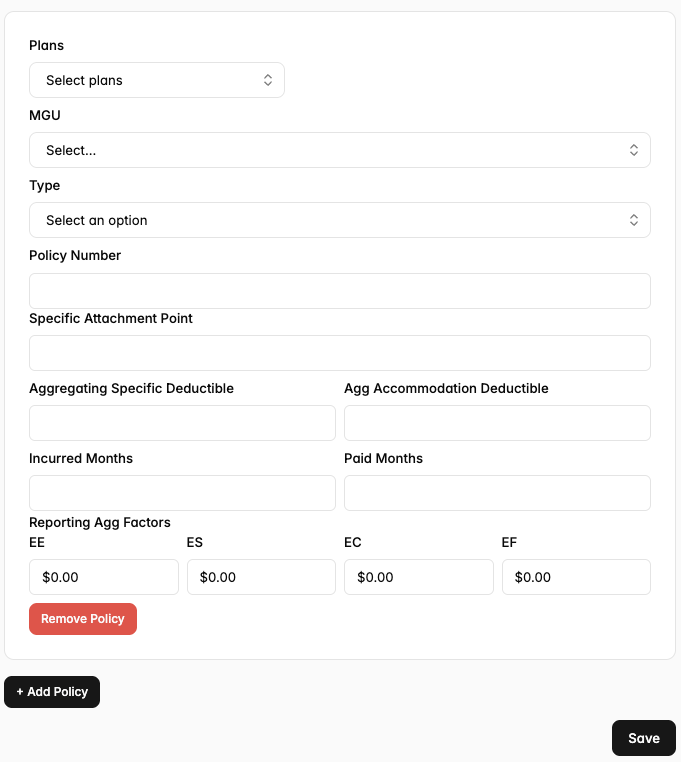
Click on ‘Plans’ to associate a group’s various plans to your stoploss details. If there are different details for different plans click ‘+ Add policy’ to create additional forms to fill out.
What is required information?
We know this form can be daunting and all Stoploss info is a little bit different! While we always encourage as much information as possible we really need (and cannot go live without) the below pieces of information.
Plans — We need each plan for the group to be attributed to a stoploss policy.
MGU — This tells us who to call up when we need to file!
Type — Specific, Aggregate, Spaggregate, Both? This allows us to understand the specifics of your coverage.
Incurred Months + Paid Months — Perhaps the most important field. This tells us if we’re handling run-in, run-out, neither or both!
Reporting Agg Factors — This is unrelated/unlinked to the fees section and should reflect the quoted Agg Factors/Claims Funding amounts from your policy.