

Process to create a Member ID card
During the New Program process, Yuzu and the Plan Designer co-create a templated Member ID card. This will be the Member ID card for each group on the plan. Using a templatized card ensures members will receive cards in a timely manner.
Enabled by our software, which uses variables to update the card based on the relevant Group (e.g., Group ID), Plan (e.g., Accumulators), and Member (e.g., Field). Each card is populated in the Plan Design Template (details HERE).
There are two ways to create a templated card: from a pre-existing template or from scratch.
Build from a pre-existing template
Yuzu highly prefers to use a pre-existing template for our cards. This streamlines the process and we have confirmed they work with even more complicated plan designs. See below for some template examples. We can share additional upon request.
Worth noting, the “template” is still a jumping off point. We can customize a card significantly using a similar structure but different variables (details below).
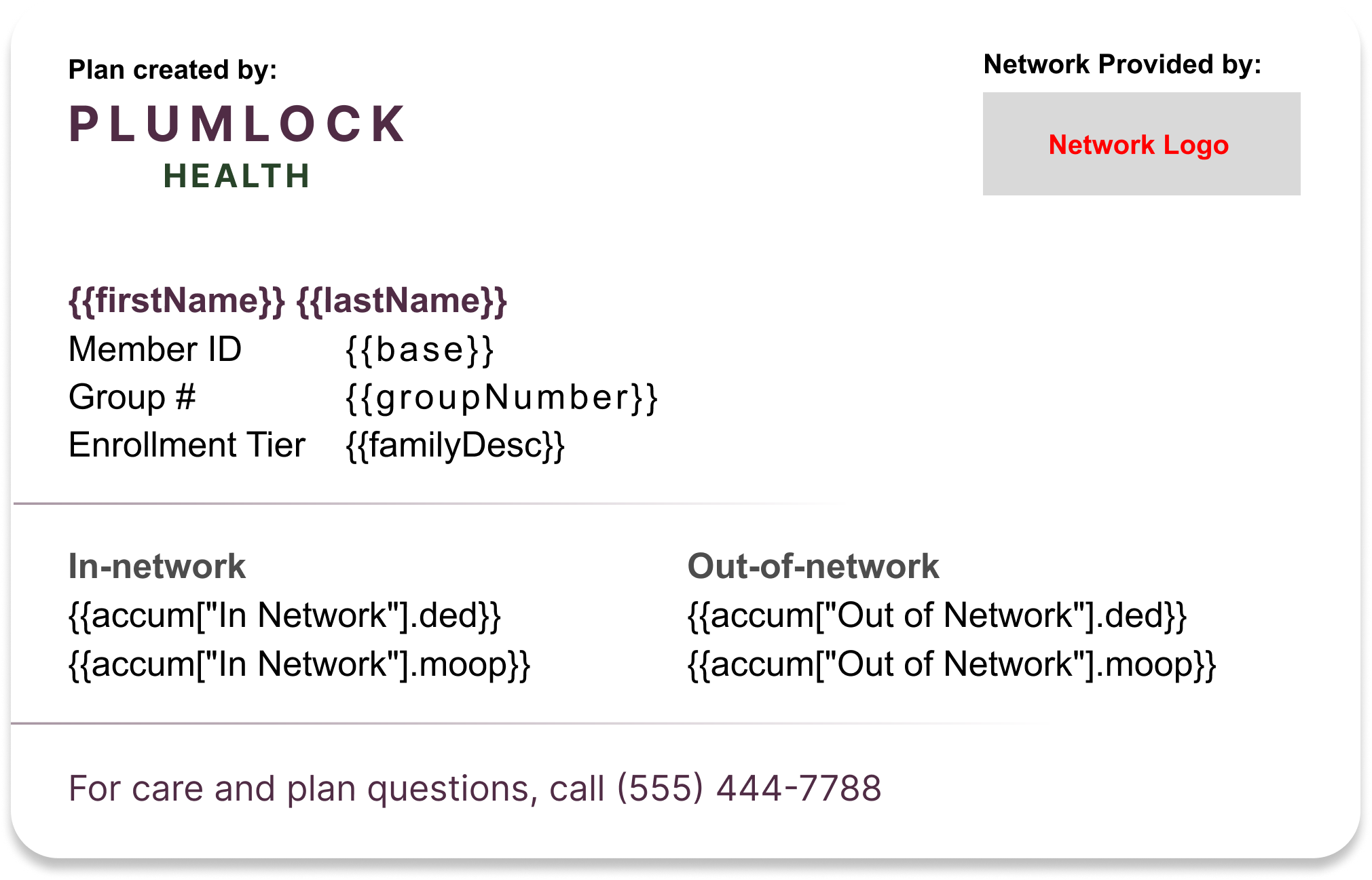
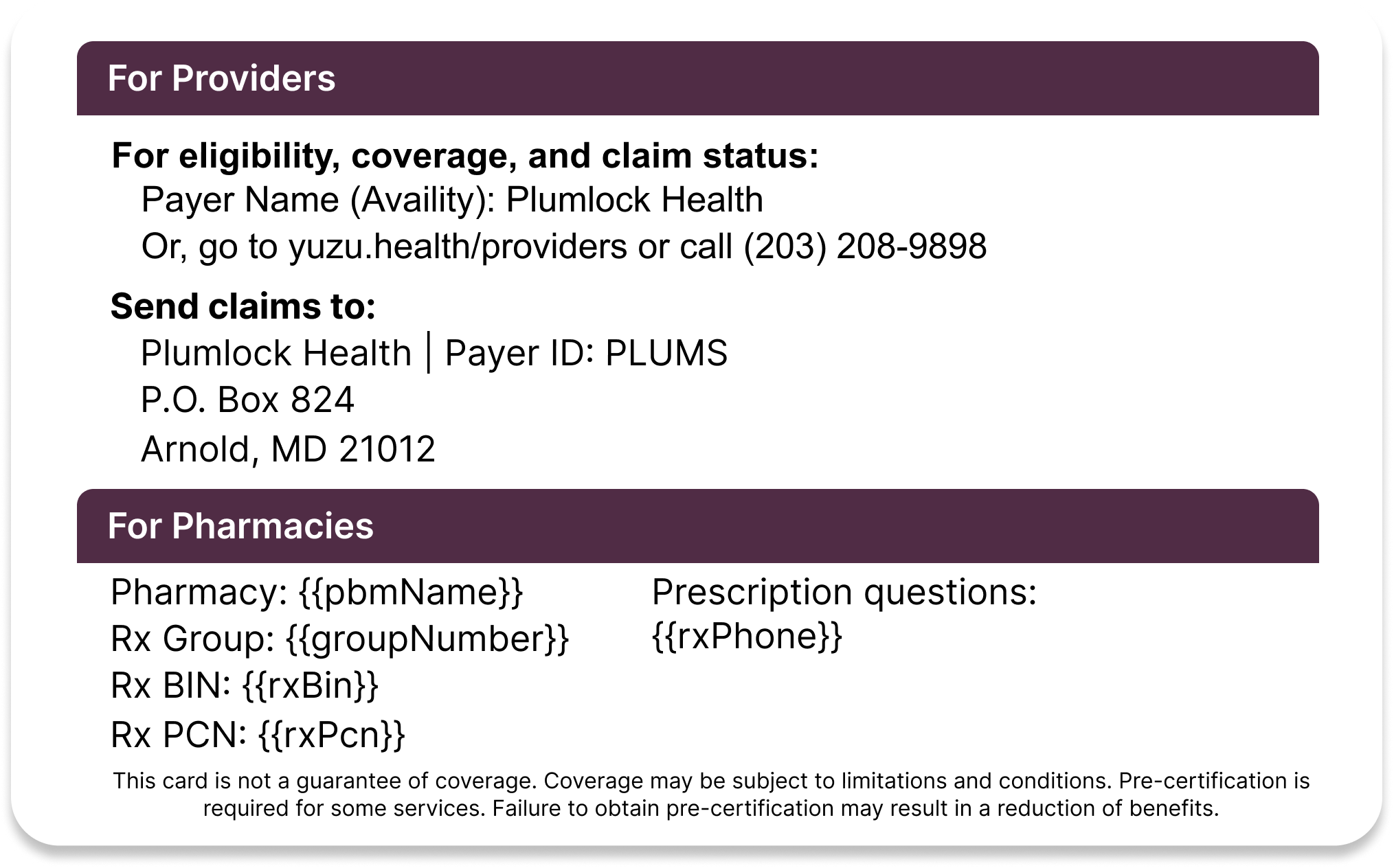
Create a card from scratch
If the Plan Designer wants to start from scratch, we prefer to receive templated cards in an .SVG file format with an aspect ratio of 500W x 316H. An SVG file format is able to be created in Adobe Illustrator and Figma.
If you do create an ID card from scratch in Figma or Illustrator, you’ll need to ensure that all art elements are vectors, but that all text is text. This is important for our dynamic variables (see more below) - our system needs to be able to “read” the text on the card to pull in the information correctly. It can only do so if the text is actual text, not vectors. This may mean you need to share an editable Figma file or non svg file type - your Yuzu contact will work with you to ensure this file is workable.
From there, Yuzu can apply the final touches to the card to make it Portal-ready.
Requirements and anti-requirements
Requirements
For Providers
Sections with Provider and Members as the intended audience are clearly broken out on the card
Either a white-labeled Payer name or Yuzu Health as the Payer Name for provider real-time status search (details HERE)
Link to the white-labeled Provider tools or Yuzu Health provider tools (https://yuzu.health/providers)
Yuzu’s support phone number (203-208-9898) featured only in the Providers section
For members
An SVG file format logo of the Plan Designer’s logo to be featured prominently
Plan Designer member support line featured prominently in the members section
For Pharmacies
For PBMs we strongly prefer for the RxGroup number to match the Group Number in the portal. This prevents confusion at the pharmacy for members.
Anti-requirements
The Yuzu logo will not be featured on the card. In our experience, having both a Plan Designer and Yuzu’s logo drives confusion.
Custom card changes for each group. A card in the Plan Design Benefits Builder needs to be the same as the card used when a group is live.
We avoid usage of {{sponsorName}}. It is a long variable and is often not necessary.
Use different number formats than what is provided by variables. (e.g., Ded must use $1000 as opposed to $1K)
Options and available variables
As mentioned, Plan Designers are able to use variables to customize their cards based on Group, Plan, and Member Information.
{{firstName}} - The member's first name (Old version, phasing out)
{{lastName}} - The member's last name (Old version, phasing out)
{{subscriberName}} - The Subscriber’s first and last name
{{subCode}} - The Subscriber’s person code
{{memberName}} - The member’s name
{{code}} - The member’s person code
{{memberNumber}} - The member's number
{{familyType}} - The coverage's family type (EE, ES, EC, EF)
{{code}} - The member's person code
{{base}} - The member's base member number (first 7 digits)
{{familyDesc}} - The member's family description (E, CH, or SP)
{{groupNumber}} - The coverage's group number
{{groupPolicyStartDate}} - The coverage's group policy start date. Please note: adding this variable does not automatically trigger card re-prints on renewal, please reach out to your account manager if you need cards reprinted
{{memberEffectiveDate}} - An individual member’s effective date.
{{sponsorName}} - The coverage sponsor name
{{accum["ACCUMULATOR NAME"].ded}} - The coverage deductible amounts for the accumulator's name (formatted like IND $1,000 \ FAM $2,000)
{{accum["ACCUMULATOR NAME"].moop}} - The coverage's MOOP amounts for the accumulator's name (formatted like IND $1,000 \ FAM $2,000)
{{accum["ACCUMULATOR NAME"].compactDed}} - The coverage deductible amounts for the accumulator's name (formatted like $1,000\$2,000)
{{accum["ACCUMULATOR NAME"].compactMoop}} - The coverage's MOOP amounts for the accumulator's name (formatted like $1,000\$2,000)
{{tier["TIER NAME"].ed}} - The coverage's cost sharing for emergency room care
{{tier["TIER NAME"].ov}} - The coverage's cost sharing for office visits
{{tier["TIER NAME"].spec}} - The coverage's cost sharing for specialist visits
{{rxCopays}} - The coverage's rx copays (formatted like $10\$20\$30\$40)
{{rxBin}} - The coverage's rx BIN
{{rxPcn}} - The coverage's rx PCN
{{rxPhone}} - The coverage's rx phone
{{pbmName}} - The coverage's PBM name
{{pcpName}} - The member's pcp's name
{{pcpPhone}} - The member's pcp's phone
{{pcpWebsite}} - The member's pcp's website
A note on virtual cards
As part of our software, members are able to view their card on desktop and mobile upon login to the portal. Yuzu encourages Plan Designers to question the necessity of a physical ID card and go with a virtual first approach.
Physical Card prints
We print ID cards “family card” style, which means each family would get a maximum of four cards per envelope. The envelope is always sent to the subscriber. Here is how members receive ID cards by tier:
EE: Always receives ID card. Subscribers always receive ID cards.
ES: The subscriber and spouse would receive ID cards.
EC: The subscriber, and child dependents (if the dependent is over 18). Up to 2 child cards.
EF: The subscriber, spouse, and one child dependent (if the dependent is over 18).
If a customer needs individual ID cards for their underage children, they can request them by logging into the portal, going to their member page, and clicking on request printed card. That will ship a card to the subscriber’s address for that dependent.