

Small Cases ($500 and under):
Once a Small Case card is created, it is active for 30 days and the card must be used within that 30-day window
Small cases are meant to be used only once, it will be automatically paused the night of usage. You can reach out to Yuzu to unpause the card within 30 days to re-activate the card for additional swipes. Small case/single use cases can be used two times to alleviate issues with some provider billing practices but will still cancel on the same date of use. Subsequent swipes cannot be made on the same date of being unpaused.
*Reminder, each swipe equals a new claim creation
Custom Cards and Recurring cards:
Custom cards are cancelled exactly 7 days after >90% of the card has been used OR on the expiration date (whichever one comes first)
Weekly recurring cards will automatically close if they have not been used for a month
Monthly recurring cards will automatically close if they have not been used for 4 months
Expected behavior for all tiers of cash cards:
If the card is not used within 30 days, then the card is automatically cancelled. You can unpause the card to reset the 30-day timer. Subsequent swipes cannot be made on the same date of being unpaused.
If the card is manually paused, it remains frozen until it is unpause and once unpaused, the 30-day window resets
Cards with pending “open” transactions are never canceled until the transaction finalizes
When expected service date field is used, the card will automatically expire 24 hours after that date. (Example: Expected service date is 3/4/2026 - the expiration date will be 3/5/2026)
If member coverage ends, all assigned cards will terminate at midnight
Cards created on prior plan years will require Yuzu approval and will require an expected service date. They will expire 24 hours after the requested date.
Expiration dates:
If an expected service date is entered, the card will expire 24 hours after that DOS.
Expiration Dates Override:
There is an expiration date override in the “edit” tab on the cash card. If you need to extend or override a card expiration date for any reason, please toggle to the ‘edit’ tab on the card, scroll down and locate the “override expiration date” field. Input the date desired and a reason in the text box. This does require Yuzu review and approval.
Priority Designations:
We now have the ability to assign priority designations: Urgent (needs to be approved within 3 hours) or Immediately (needs to be approved within 15 mins)
Please note: Yuzu will still be checking the cash card requests periodically throughout the work day, so cards with no priority designation will still be approved timely.
Updating Card Spend Amounts:
If at any time you need to update the spend amount on a card, you can go to the card’s details page and find the pencil icon at the top right corner above ‘Starting Funds’. You will get a popup to request additional funds. Yuzu will get a notification and will need to approve the additional funds.
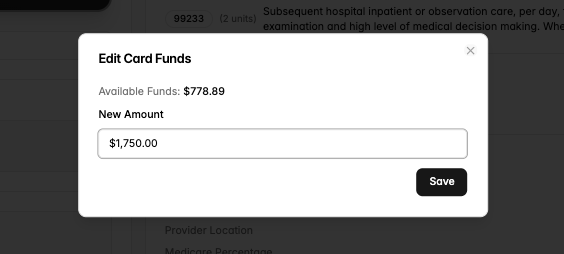
There is no longer a per-swipe dollar limit. Cards including large or custom amounts ($10k+) can now be swiped in a single transaction without a per-swipe limit!
Card Misuse Prevention:
We have a new feature to block certain Merchant Category Codes! This is to further strengthen our ability to prevent Cash Card misuse. If a card attempts to be swiped at an unauthorized merchant category, the transaction will automatically void. Yuzu has the ability to override the Merchant Category if the swipe is desired, just let us know and we can edit the card to allow the next swipe!