How does this work?
Termination: This will occur either manually through eligibility changes managed by the employer or automatically through an updated file from a Human Resources Information System (HRIS).
When a member is terminated and they are COBRA eligible, the TPA updates their status to ‘COBRA Pending, Awaiting Election’
The TPA will not invoice the Employer for their coverage post-End Date
Notice sent: The TPA sends a COBRA notice to the member via Certified Mail and by email
If a member opted in electronic communication, then only an email is sent
Portal updated: If the member chooses to do so, they login to the portal and complete the ‘Elect COBRA’ electronic form and be prompted to connect their bank account
COBRA Coverage: COBRA Coverage: The TPA updates their status to "COBRA Active" and bills them monthly, one month ahead, from their connected bank account (see "How and when are premiums collected?" below).
What are the TPA’s responsibilities?
Sends timely COBRA election notices
Tracks election deadlines and grace periods
Processes election decisions
Collects members’ premium payments
Manages coverage activation and termination
Communicates status to members and vendors
Ensures compliance with federal COBRA rules
Continue to administer plan benefits to COBRA-elected members
How and when are premiums collected?
COBRA premiums are paid one month in advance
On the 15th of each month, the member's invoice for the following month is created and visible in their portal.
Between the 23rd and the end of the month, on the auto-pay date the member chose, the premium is pulled from their connected bank account. (If they pick the 31st, it runs on the 30th in shorter months.)
If a payment fails or isn't made, coverage is paid through the last month covered; the TPA tracks grace periods and follows up with the member.
Employers are not invoiced for COBRA members - premiums are collected from the member directly.
How are COBRA premiums set?
If a group is max level-funded (benefits are paid up until the aggregate attachment point), then the COBRA premiums for Yuzu-managed COBRA are default set to be the total of all sub-fees.
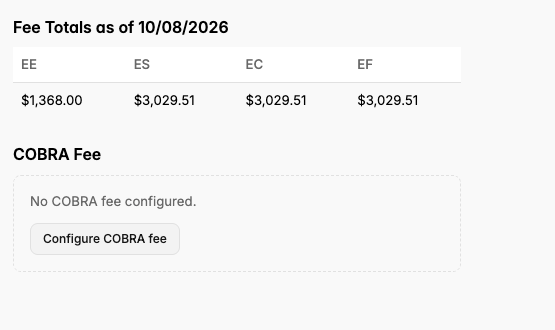
If a group is traditionally self-funded (“Weekly Funded” in Yuzu’s system), then employers must set the fees that correspond to premium, deemed “Premium Equivalents”. Your broker can help you set these fees, and they should correspond to an expected claims cost plus admin fees. These are the fees that COBRA members would have to pay on your plan.
You can do this by going into a Plan (Plan tab, left sidebar), clicking “Fees”, and clicking “Configure COBRA Fees”. These must be configured for each tier of your plan.