

Action required by employer / broker if there is external COBRA:
Indicate External Vendor in Rules
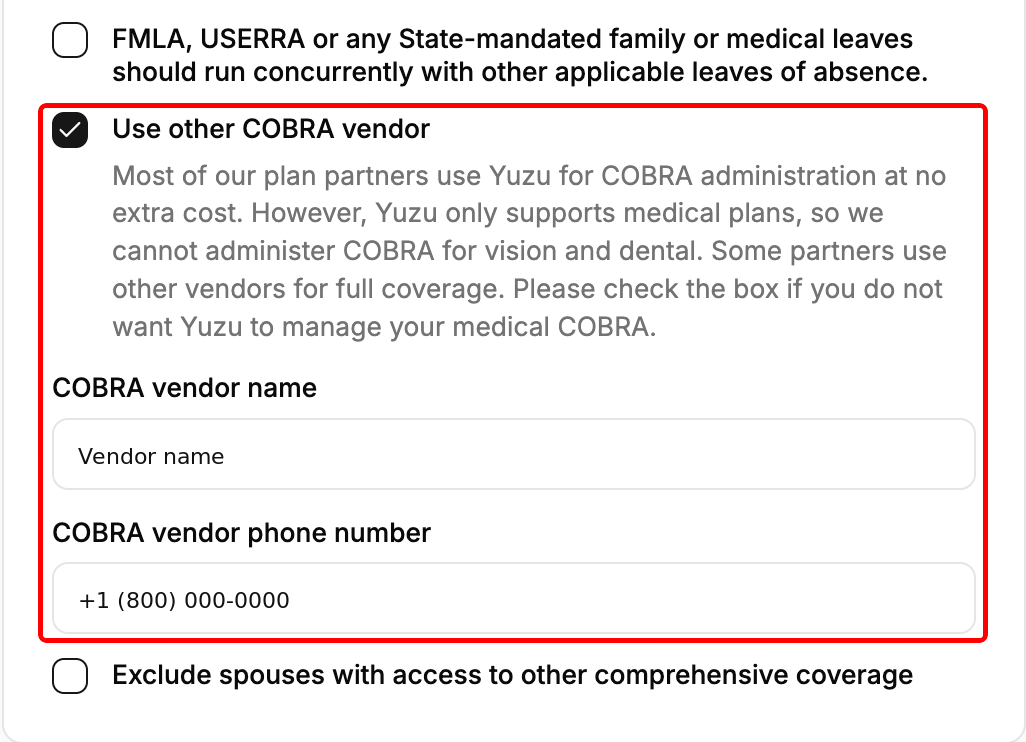
If using non-Yuzu COBRA, go to Plans → Policy card → Edit, check "Use other COBRA vendor" and add the vendor name and member service phone number. You can update this later too, as long as no one in the group is currently on COBRA.
Employer/Broker Requirement: Update Yuzu on Election Statuses
Collect COBRA election decisions from external COBRA vendor
Log in to the portal, go the ‘Members’ tab or the specific member’s page, and click their election decision as ‘Elect’ or ‘Decline/Expired’
How does this work?
Termination: When a member is terminated (no matter if they are COBRA eligible or not) we update the status to “COBRA Pending, Awaiting Election”
We will not invoice the Employer for their coverage post-End Date
Notice sent: External COBRA vendor and/or Employer sends notices, collects decision, collects member’s bank information
External COBRA vendor to collect member premium from member and reimburse to Employer
Portal updated: Employer (or broker, plan designer on Employer’s behalf) collects election decisions and logs into portal to update status
Upon ‘Election’ we will reinstate invoicing the Employer for their coverage for the extent of their time as COBRA Active
Ending COBRA Coverage: External COBRA vendor to update Employer (or broker, plan designer on Employer’s behalf) when members stop coverage
Employer to log into the portal to set COBRA End Date
We will not invoice the Employer for their coverage post-End Date
If COBRA is elected in the portal, what is Yuzu (the platform) responsible for?
Continuing to administer plan benefits as typically provided in our role as TPA
Invoicing the Employer for their coverage until Employer deems their coverage terminated
Yuzu will pull funds from the employer directly if COBRA is managed externally