

What's in it
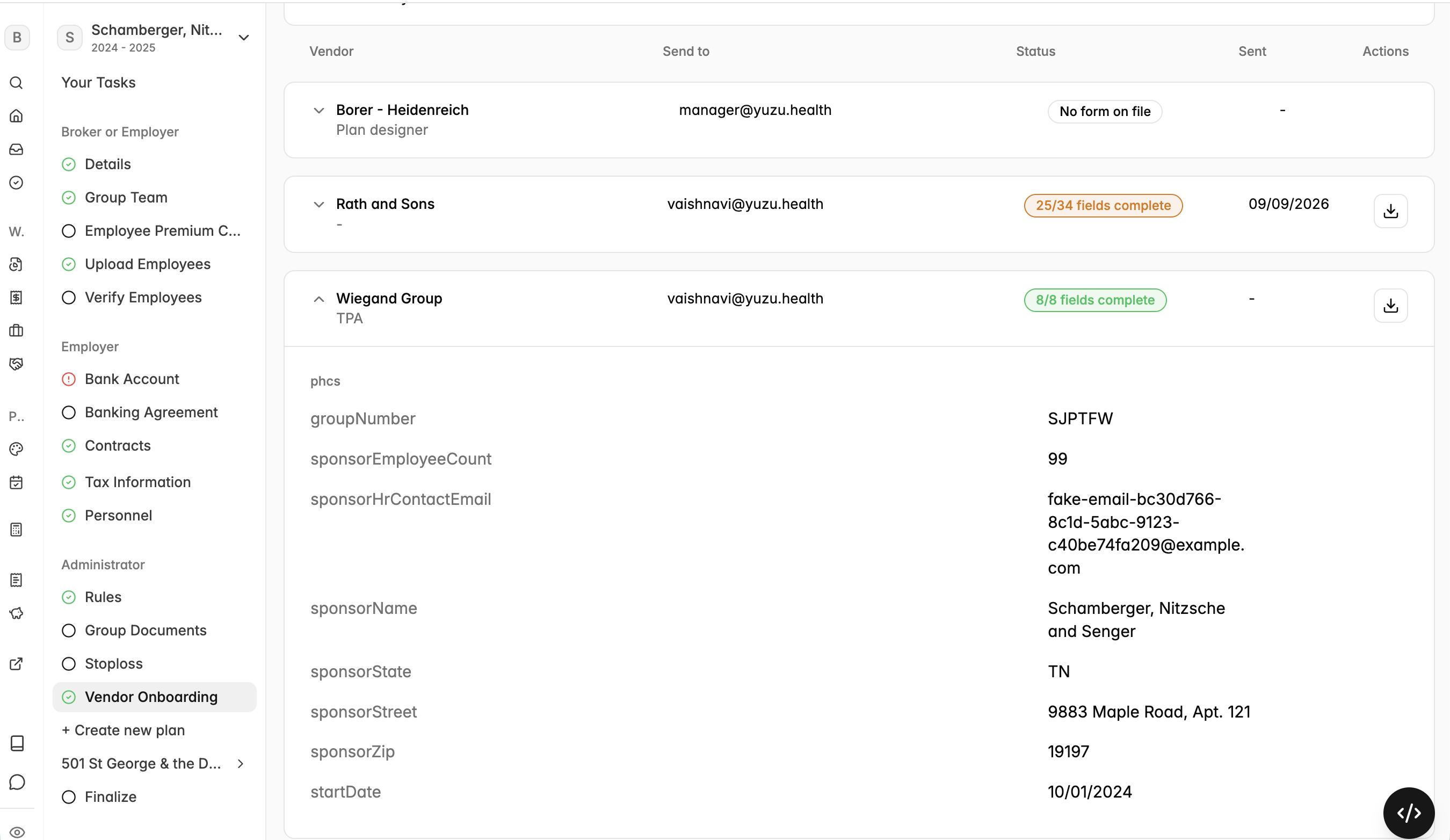
Full vendor list - every vendor the group has onboarding forms with, and the vendor type (network, PBM, UM, stop-loss)
Send details - when each form went out and where it was sent
Completion status at a glance - e.g. 8/8 complete vs. 19/37, without opening anything
Expandable rows - open a vendor to see field-by-field status. Clicking a field jumps you to the place in the portal where that field lives, so filling a gap takes seconds.
Why it matters
Outstanding vendor forms are one of the most common reasons an implementation stalls, and until now the only way to know what was missing was to ask. This puts the same view in front of you and us, so a blocked field is visible the day it blocks something rather than at the next check-in.
Where to find it
Open the group in the portal.
Go to the Vendor Onboarding tab.
Expand any vendor row to see field-level status.
Click a missing field to go straight to where it's entered.
What hasn't changed
Form submission works exactly as before. This release is visibility only.
Coming next
Renewal and termination forms move onto the same flow, signature fields can be completed without leaving the form, and forms send automatically once triggered.a post...