

Overview
Yuzu is not a clinical organization. If a plan has a Utilization Management (UM) solution for prior authorizations, that vendor is the ultimate source of truth for authorization timelines, statuses, and appeals.
Prior authorizations determine whether a service meets medical necessity requirements, but do not guarantee coverage or payment. Even with an approved authorization, Yuzu still adjudicates the claim based on the plan's benefits, member eligibility, exclusions, network rules, cost sharing, and applicable limits. A claim may still be partially paid or denied for reasons unrelated to the authorization.
Our role in determining if a prior authorization is necessary
Yuzu’s role is to maintain the list of services that will require prior authorization and direct providers to the relevant prior authorization vendor when it is deemed potentially necessary. These lists are updated intermittently and vary by solution. Yuzu is not liable for the accuracy of the list of services and the Utilization Management solution should be viewed as the ultimate source of truth.
On the “Benefits” tab for a Plan we flag when a code is on one of these lists. This also includes other important parameters such as a dollar limits. Users can access these lists to verify if a code is on the list.
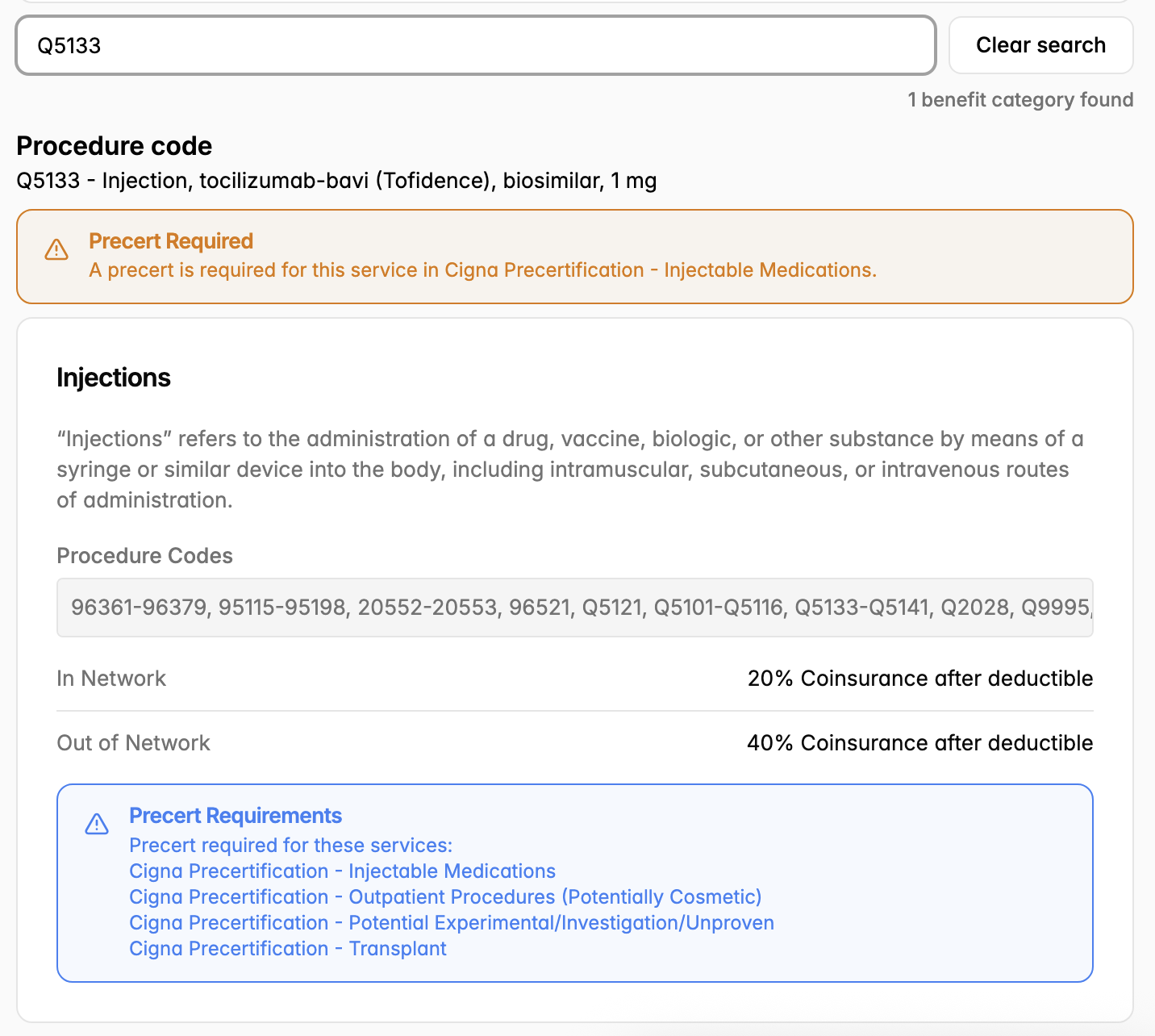
How to request a prior authorization
Members cannot request a prior authorization from Yuzu. Your provider (the doctor who orders the service) sends the request to the plan's Utilization Management (UM) vendor.
Members: ask providers to submit the request before your service. The UM vendor's phone number is on your member ID card.
Providers: send the request to the plan's UM vendor. See "Vendor details" below.
Cash Pay plans: your Care Coordinator submits the request. See Prior authorization (Cash Pay): HERE.
Our role in receiving prior authorizations
We receive prior authorizations over EDI daily from all Utilization Management partners. These contain the unique identifier, member demographic, provider information, service information, and decision status.
For a group, all relevant pre-certs can be found in the “Pre-certs” tab which shows the pre-cert number, status, patient name among other information. If a detail about these prior authorizations is incorrect, Yuzu cannot make changes. The Utilization Management vendor needs to be reached out to correct their mistake. For a member, the “Pre-cert” tab with all the relevant pre-certs.
The five statuses are: Approved, Denied, Pending, Partially Approved, Cancelled. Partially Approved means the UM vendor approved only part of what the provider asked for. Either some codes were approved and others denied, or fewer units were approved than were requested. These claims are reviewed line by line.
For pending prior authorizations (i.e., prior authorizations that are not yet approved or denied but are in the process of review by the Utilization Management vendor), the Utilization Manager will need to be contacted for timelines and escalations. In most cases, the member or provider need to be the advocate for these requests to go through. Unfortunately, Yuzu, Plan Designers, and Brokers are not given the same escalation pathways.
Matching prior authorizations to claims and adjudicating
Yuzu matches prior authorizations to both a member’s coverage and claims automatically. Coverage matching works by matching the demographic information in the portal against the prior authorization. Claim matching works by looking at the approved procedure and diagnosis codes, dates of services and providers. The logic is more complex on the claims side to take a more comprehensive approach but it is not a perfect system: the prior authorization we receive is not always going to match the claim. Details on reprocessing requests below.
For a claim where a pre-cert is required but missing, the claim is pended for manual review. ER and urgent care waive the requirement. For facility claims, a mismatch between certified and billed units also sends the claim to manual review.
Prior authorization date and unit mismatches
A pre-cert may approve specific dates of service or a limited number of days or units. When adjudicating a claim, Yuzu checks whether the billed services match the approved authorization.
Fewer days or units approved than billed: For facility claims, a mismatch between billed and approved days or units sends the claim to manual review. Additional days are not automatically paid. The provider should contact the UM vendor to request an extension or concurrent review. Once the authorization is updated, the claim can be reprocessed.
Service dates outside the approved range: If the claim's dates do not overlap with the approved authorization dates, the pre-cert may not match, and the claim can be pended for manual review. The provider should contact the UM vendor to correct the dates or request a new or retroactive authorization.
Professional claims may have a small date buffer around the approved range for matching purposes, while facility claims generally require overlapping dates.
Retroactive prior authorizations and reprocessing
If a claim is pended or denied because a required pre-cert is missing, the provider or member should contact the UM vendor to request a retroactive certification (retro-cert). Only the UM vendor can approve or backdate a pre-cert. Yuzu cannot issue one, and retro-cert requirements and submission deadlines vary by vendor.
If the retro-cert is approved, it is sent to Yuzu through the normal EDI feed and becomes visible under the member's or group's "Pre-certs" tab. Once the approved pre-cert is on file, submit a claim reprocessing request using the process outlined below.
Reprocessing claims after a change to a prior authorization
For claims that need to reprocessed because a prior authorization came in after a prior adjudication or a detail about a prior authorization changed, the best route is to create a case as Plan Designer with the prior authorization and claim attached to the case. Title: Prior Authorization Reprocessing Request: {Claim Number}”
If you are a broker, provider or member, submit your request to claims@yuzu.health with the prior authorization and claim number included.
Escalating a denied prior authorization
Escalations for denied prior authorizations will need to be handled by the member or provider. The TPA, Plan Designer, Broker are not given the same escalation pathways unfortunately. These vendors will need to be contacted over the phone which is included on the member’s ID card.
Requests to waive a prior authorization
These are reviewed case-by-case. Examples include: the prior TPA didn't require one, the provider was told it wasn't needed, a preventive screening. The best route is to create a case as Plan Designer. Title: Waive prior authorization: {Claim Number (if applicable)}”
If you are a broker, provider or member, submit your request to claims@yuzu.health with the relevant details included.
Vendor details
Cigna Pre-certification (TruCare): On all plans with Cigna as the Network, Cigna’s Utilization Management solution, TruCare, handles prior authorizations. Escalations for timeline will need to run through Cigna.
When a denial occurs, Cigna sends a letter to both the member and the provider. This document will provide the most insight that can be supplied as to “why” something was denied. We, as the administrator do not have the ability.
MedWatch: For some non-Cigna plans, MedWatch runs the prior authorization process. MedWatch sends us “Pending” certifications so the user can have visibility when a pre-certification process has been kicked off without needing to contact MedWatch directly.
EHG (Engaged Health Group): For some non-Cigna plans, EHG runs the prior authorization process. EHG sends us “Pending” certifications so the user can have visibility when a pre-certification process has been kicked off without needing to contact EHG directly.
Prior authorization and cash pay
When a plan is Cash Pay, the rules of prior authorization are different. Details on the process in this doc: https://yuzu.health/docs/guides/prior-authorization-cash-pay