What are Cases?
“Cases” is Yuzu’s in-house case management feature that enables communication about a case and attachment of relevant documents between parties.
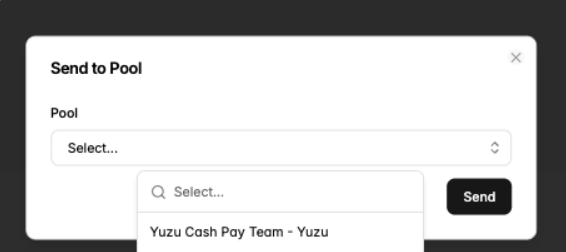
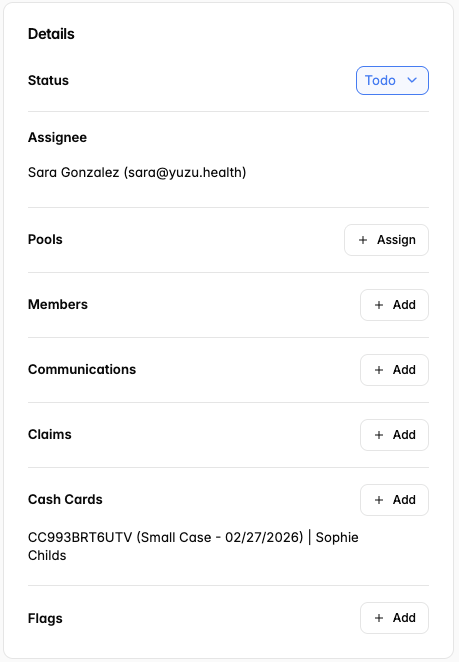
Features of Yuzu Cases include: adjusting the status of the claim (e.g., In Progress, Resolved), attaching communications (e.g., conversations recorded through our AWS support system), attaching claims, assigning individuals, assigning a Pool (designating the type of case)
Yuzu will not auto-adjudicate claims for members with open cases.
If there is information you would like to keep on record for a member but it is not pertinent to upcoming / ongoing claims, please use the ‘Notes’ feature to record details and comments.
How to create a case?
There are three ways to create a case.
Go to the member profile > cases tab > ‘Create Case’
Go to the Group cases tab on the side bar > select ‘+ New’ in the top right corner
While viewing a claim, you will see ‘Cases’ on the tab bar. Follow the same flow as above.
Please create a case for any situation that requires additional context or clarification. Examples include:
Maternity cases
Estimated Due Date (EDD)
Type of delivery: Vaginal, C-section, VBAC
Place of Delivery: Hospital, Birthing Center, Home
These answers will help add context to the overall cost of the pregnancy
Surgical cases (It is recommended to begin the medical record retrieval process as soon as possible, since any case exceeding $10,000 must be submitted to MedWatch for a medical necessity review.)
Any Accident or Injury: That being said, we will also need to kick off an Accident Investigation Form before processing anything
Requests for exceptions to standard processing procedures
Claim adjudication changes: Appeals, reprocessing, COB changes, etc. Make sure to assign to the appropriate Plan Designer Yuzu Pool. (e.g.,: Yuzu Claims - Plan Designer X - Yuzu).
NSA/Open Negotiations
Please make sure when creating the case titles that they are short, descriptive, and informative. Case titles could include diagnosis, signs/symptoms related to the claims, Dispute number, etc. Some example case titles:
Maternity – EDD 8/15/26, C-section at Memorial Hospital
Knee arthroscopy – MedWatch review pending ($12,500)
MVA 4/22/26 – Accident Investigation Form sent
Appeal – Claim #12345, denied for medical necessity
COB update – Primary now Aetna, eff. 1/1/26
Reprocess Claim #67890 – Corrected CPT from provider
NSA Dispute #NSA-2026-0847 – ER services, out-of-network
Assigning and working in Cases
*Please assign cases appropriately so the right team can work on it (Pools)
What are Pools?
Pools are what we call the designated Subject Matter Expert (SME) team assignments.
Individuals who are assigned within a Pool will get notifications any time a case is sent to that Pool.
Assign the case to the individual who has the action item/is actively working on something
Be as specific as possible and provide all necessary context in the case with what you are needing to be reviewed by the assigned individual (Eg: assigning to Sara Gonzalez within the ‘Yuzu Cash Pay Team - Yuzu’ and asking for help pricing, then place in the ‘Todo’ status)
Please @name the person who you are asking to do something or who you need help with something.
All communications should be professional and factual — no opinions. Always attach the relevant letter and note the delivery details in the log, for example: "Sent to MedWatch on May 1st, 2026