

Why upload a claim?
To file for reimbursement for a service your plan covers (primarily through coordinated care).
To have a service you paid for count toward your deductible or out-of-pocket maximum (uncoordinated care).
How do I upload a claim?
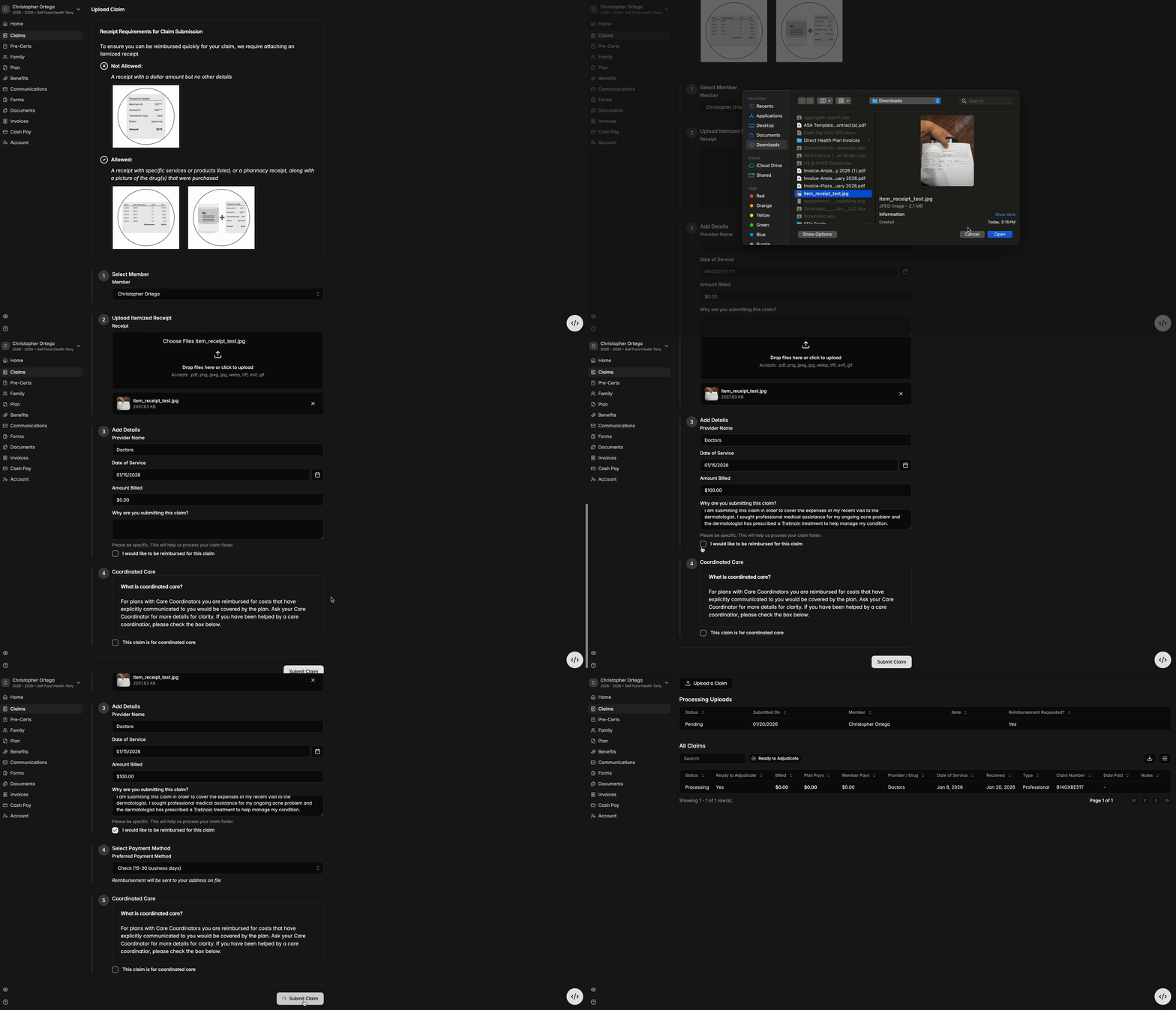
To start, on the Claims tab, click ‘Upload a Claim.’ In the memo, include the provider name, date of service, amount billed, and reason for submitting the claim.
An itemized receipt with service details or an Rx bottle label and a simple transaction receipt are required for the claim to be submitted. Please upload all information necessary to understand and assess the claim.
Click the checkbox to indicate you've requested a claim reimbursement, then choose your preferred method of payment. This can be done via a linked bank account already established, or by connecting a new one through Plaid. See instructions on connecting banking here.
Lastly, you will have the option to specify whether the claim pertains to coordinated care.
Please note: the demonstration video below illustrates using a check as the preferred payment method. If you select 'direct deposit' instead, as we recommend for quickest payment, you will have the option to link to a pre-existing bank account or you’ll receive prompt instructions to connect a fresh account through Plaid.
How do I know if I will be reimbursed?
Reimbursement depends on the specific details of your plan coverage. You will be reimbursed in accordance with these benefit details.
I’ve requested a reimbursement. When will I get paid?
Once you’ve requested reimbursement, your claim will be reviewed and adjudicated by one of our Claims Specialists. We try to get through these quickly, but this process typically takes 2 - 3 weeks if no additional information is needed.
You will receive notice from Yuzu when you have been paid through a bank transfer to your connected account. Learn more on how to connect banking here.
How does Subscriber vs Dependent connected bank accounts work?
Subscriber Claims:
If the subscriber has a connected bank account, the ACH will be sent upon a Claims Specialists clicking “pay.”
If the subscriber does NOT have connected bank account, they will receive an email to connect their bank. A check will be sent in 7 days if they do not connect.
Dependent Claims:
If the dependent has a connected bank account, the ACH will be sent upon a Claims Specialist clicking “pay.”
If the dependent does NOT have a connected bank account:
For dependents under 13, if the subscriber has a connected bank account then the ACH will be sent to the subscriber upon a Claims Specialist clicking “pay.” If the subscriber does NOT have a connected bank account, they will receive an email to connect their bank. A check will be sent in 7 days if they do not connect.
Claims for dependents over 13 are treated the same as subscriber claims. Follow the Subscriber Claims flow above.
The claim paid less than expected, or didn’t pay anything. Why?
Members often expect that their entire claim amount will be paid. In reality, depending on the benefit plan claims process less than expected for two reasons:
If the benefit plan is a PPO, then manually submitted claims are processed at the Out-of-Network tier level. Thus the claim may still be “covered” by insurance, but may not lead to any reimbursement.
Manually submitted claims are still processed according to maximum allowable charge definitions as defined in the SPD, generally defined to be between 150% and 225% of Medicare. This is the maximum the plan allows for that benefit.
Claims may still have cost-sharing applied. Many of the plans Yuzu administers allow members to manually submit claims towards a “Coordinated” benefit tier that has $0 benefits, but some plans process these claims with cost-sharing.