

There are three ways for you to look up the status of a claim in Yuzu:
Signed in
If you have a portal account, the fastest way is Find a claim on your Home page - search by claim number, check number, or ACH trace number. Or open the Claims page and search or filter there. Clicking a claim shows its full details, timeline, and EOB. See Seeing Claims in Portal.
By Claim Number (no login)
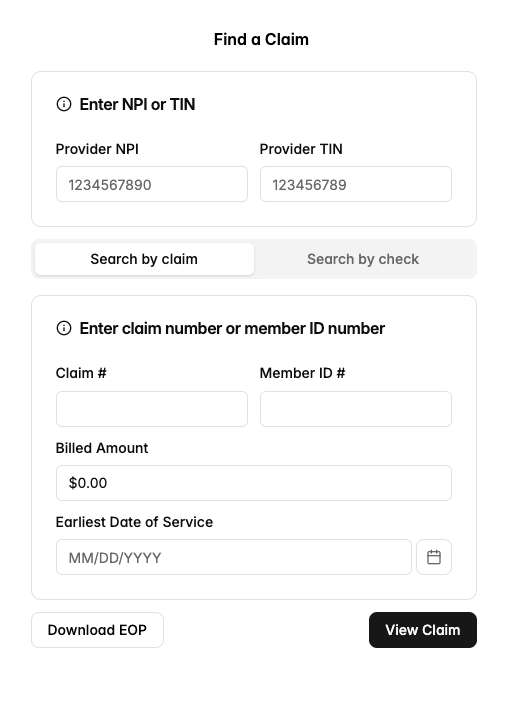
Go to https://yuzu.health/providers → Find a Claim. Enter your NPI or TIN, then the claim number (or member ID), billed amount, and earliest date of service. You will see the claim's status, dates, and amounts, and can download the EOP once the claim has finished processing.
By Check Number (no login)
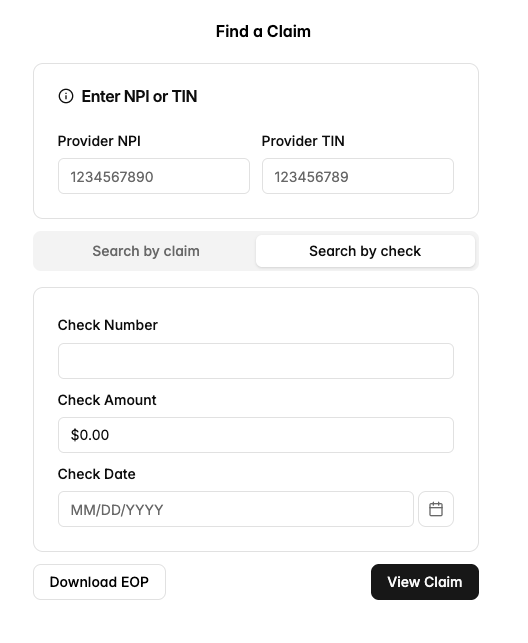
If you only know the check number (for example the check was deposited but the remittance information was not saved), choose Search by check and enter the check number, check date, and amount to get the EOP again.
If several claims match your search you can page through them with Previous Claim / Next Claim or use Download All EOPs.
You can also check eligibility without logging in. Please check the “Check Eligibility Guide.”