Yuzu’s Launch Process consists of four stages:
Kickoff: Kickoff has you work through: Yuzu’s reseller agreement, an end-to-end demo, our SOW, documentation for The Build, and integrations.
The Build: This is the meaty part. We build Plan Design templates, get you white-labeled with Yuzu, and provide relevant demo data based on your Build.
Sign-Off: This includes a visit from the Yuzu Customer team to your HQ, sign-off on The Build, and training for your team on the Yuzu platform.
Onboarding: Once you’ve got a sold group, we work through our onboarding process together. You’ll get the hang of things and start onboarding groups in no time.
Yuzu prefers to run the above process at least 60 days before the first group’s effective date.
The Platform
Yuzu is a fully web-based, AWS hosted, and single log-in platform. While there is one log-in, the view of the platform the user is taken to is dependent on their role-based permissioning. The three instances are:
Organization Portal (for all Plan Designers, Vendors, and Sponsors)
Member Portal
Provider Portal
Additionally, within the organization portal, permissions (e.g., visibility into claims data) differ based on the vendor type / role (e.g., Plan Designer vs. group HR contact). These permissions can be adjusted live by the TPA and Plan Designer on our Permissions page.
Key Terminology and Structure
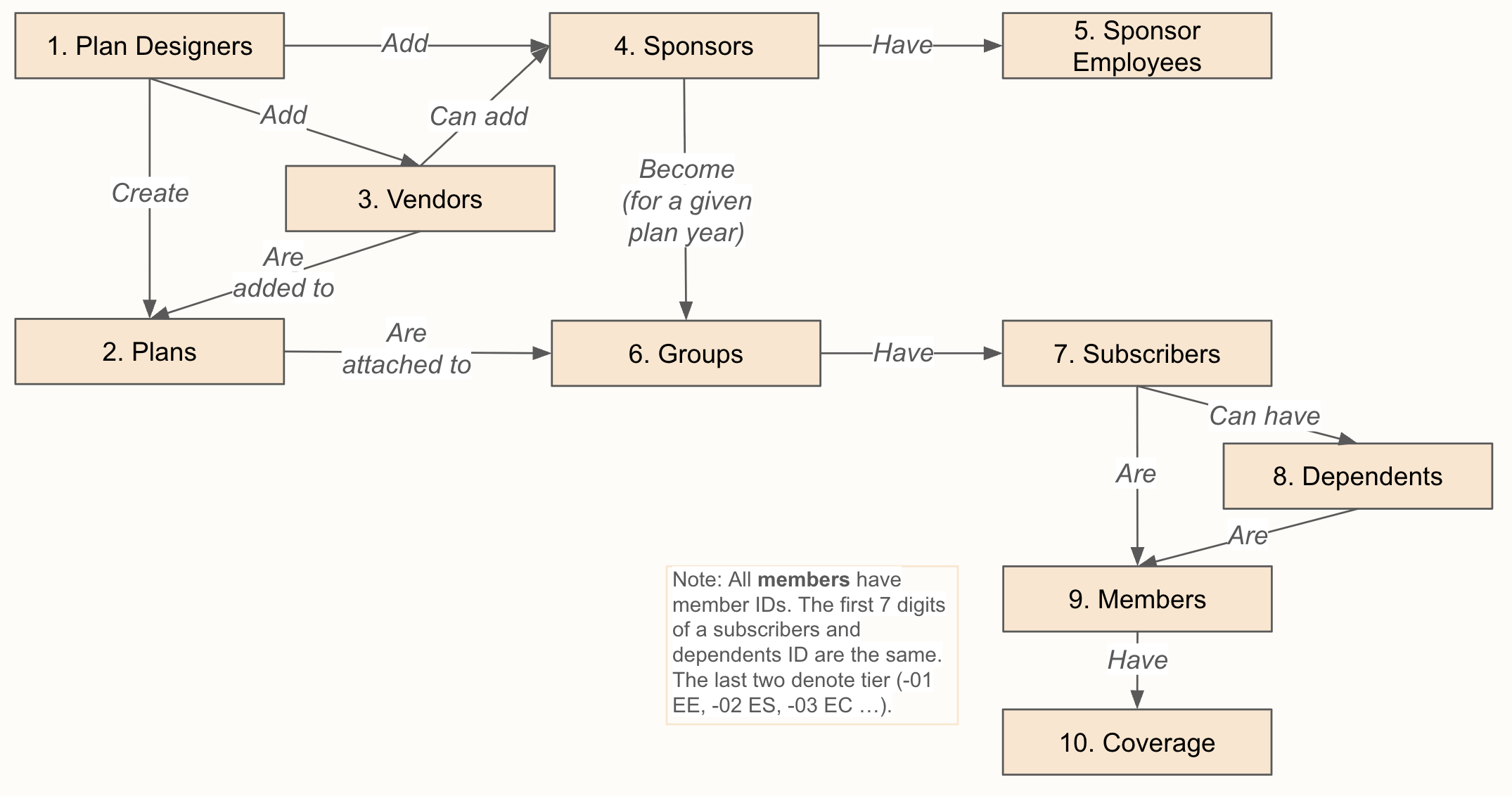
Platform definitions and structure explanations.
Plan Designer: The creator of the plan and manager of their relevant vendors. Full portal permissions.
Plan: Templated plan designs built by the Plan Designer. Includes benefit configuration, cards, welcome materials, etc.
Vendor: Entities associated with a plan that are not the employer (e.g., Broker, PBM, Stop Loss); permissions adjust based on role within a plan.
Sponsor: The employer. Contains info like company details, EIN, address.
Sponsor Employee: Authorized sponsor user, with defined roles and admin permissioning (e.g., HR contact). Has access to the organization portal.
Group: Information about a sponsor in a given plan year. (start/end, Group Number, onboarding status).
Subscriber: The employee attached to the group enrolled in a plan. Associated subscriber ID.
Dependent: The spouse or child or the subscriber.
Member: The enrollee in the plan. Contains identifying and demographic information. Has access to member portals. Members can have multiple coverages. Associated member ID.
Coverage: The instance of a member being on the plan (start date, end date, associated claims).